
Home/Preschools/Blurred alert snapshots
Every alert snapshot blurs the faces of children and staff.
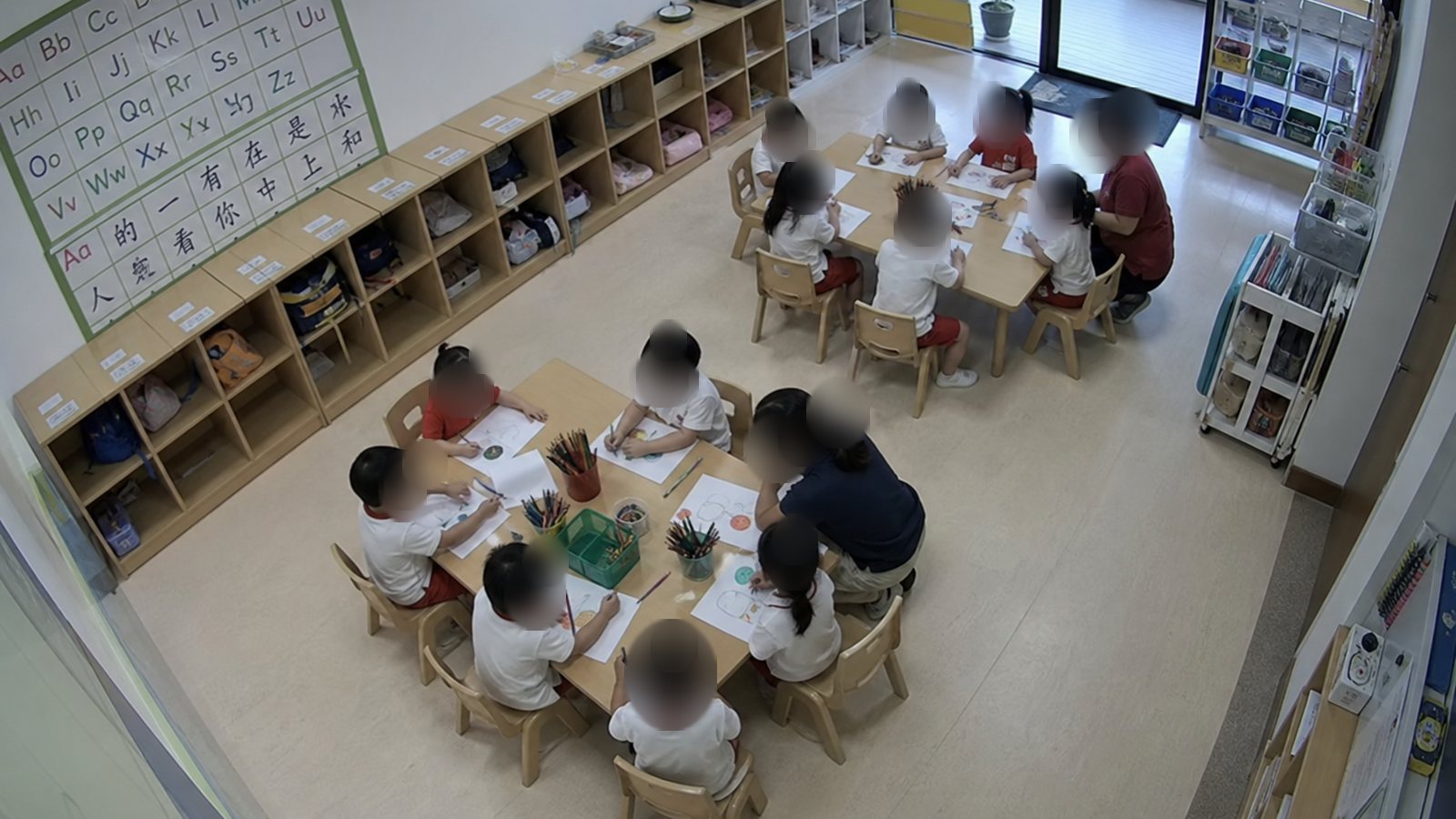
Havenwatch AI blurs each face before a snapshot leaves the on-site server. Educators see what happened and where, and the alert identifies no child and no staff member.
 EducatorEducator
The snapshot an educator receives
The snapshot shows the room, the door and where the child is. Every face in it is blurred before it reaches a phone.
EducatorEducator- 10:05Educator in the room alerted
- 10:05Acknowledged on the tablet
- 10:06Door shut, child back at the table
What a blurred alert snapshot shows
The trust centre defines the alert still for each setting.
Shown
The room, the zone and where each person is standing or sitting.
Blurred
The face of every child and every staff member in the frame.
Left out
Names, audio and any view of a toilet or changing room.
Text only
A centre can send any alert as text, with no snapshot at all.
Where the blur is applied
Faces are blurred on the server in the centre, before a snapshot is saved or sent.
Related: Parent footage requests, Incident records and evidence export, Unattended child alert.
On the on-site server
Each face is found and blurred before the snapshot leaves the building.
In every channel
Phones, Teams, SMS and the dashboard all carry the blurred copy.
In records and exports
Incident records keep the blur, and exported clips mask other children.
Original footage
The recording stays on the centre's recorder under its own access rules.
What Havenwatch will never do
No cameras in toilets or changing rooms
Havenwatch reads only the cameras a site connects. Toilets, bathrooms and changing rooms stay out of view.
No live feeds for parents or families
Live video stays with the staff on duty. A parent or family member asks the site for a clip in writing.
No verdicts on intent or fault
An alert states what the camera saw. A named person decides what it means.
No scores for individual staff
Reports are grouped by room, floor, shift and routine.
No audio
No sound is recorded or analysed in any room.
No face recognition beyond pick-up
Face matching runs only at preschool gates, with consent from each adult, and stays off until the centre turns it on.
Questions about blurred snapshots
Are faces blurred in every alert?
The faces of children and staff are blurred in every alert snapshot. At pick-up, the educator at the gate sees the collecting adult's face only if the centre has turned on pick-up matching.
Can a manager remove the blur?
The alert snapshot is saved blurred, so the blur stays on it for good. Named staff can view the original recording on the recorder, and each view is logged.
Why are staff faces blurred as well?
Alerts are about rooms, gates and children. Blurring staff faces keeps each alert about what happened in the room.
Can alerts be sent with no picture?
Any alert can be sent as text only. The text names the room, the zone, the time and what the camera saw.
See blurred alert snapshots from your own rooms.
The pilot runs for four weeks in one centre, and staff see each snapshot as it would be sent.